Favicons
Definition
A favicon, short for "favorite icon," is a small icon that represents a brand on web browsers and in operating system iconography. The icon is usually the graphic mark, or a variant, of the brand’s logo. Favicons are also known as website icons or bookmark icons.
Usage
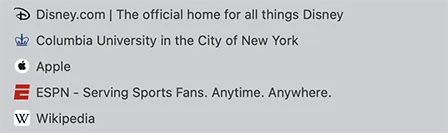
Favicons help to quickly visually identify a brand, making it easier to locate an open tab when searching through multiple tabs or to locate a specific bookmark in a long list. They are usually displayed in:
-
Browser tabs next to the page title
-
Bookmarks or favorites lists
-
Browser history pages
-
Shortcuts saved to a home screen (on mobile devices)
When used in a URL address bar, favicons make it easier to recognize a brand’s official website. While a brand’s logo ro graphic mark can offer easy visual identification, it can sometimes present challenges if there is text involved. Due to size limitations and resolution issues, favicons using text can be difficult to read. Therefore, it is recommended to avoid using text in favicons.
Most schools and units at Columbia on the Mornsingside campus use the modern crown with crosses; however, Columbia College and Columbia Engineering, for example, use crown variations long associated historically with those schools. The graphic mark for CUIMC is the modern cross with diamonds.

Specifications
For an optimal image, it is important to ensure a favicon is created in square pixels. The preferred format for favicons is a scalable vector graphic, or SVG. Though a png (portable network graphic) format is adequate and can suffice if a vector file is not available, an SVG can be converted into an ICO (image file format for computer icons), rendering a scalable image compatible with desktop and mobile screens.
The suggested size of a favicon is 256 x 256 pixels.
Traditionally, browsers only supported the 16×16 pixel size; modern browsers, however, support multiple sizes such as 32×32, 48×48, and even 180×180 for mobile.
To request permission to use the Columbia University favicon, email [email protected].

<!-- Located within the <head> tag -->
<link href="/favicon.ico" rel="icon" type="image/x-icon" />